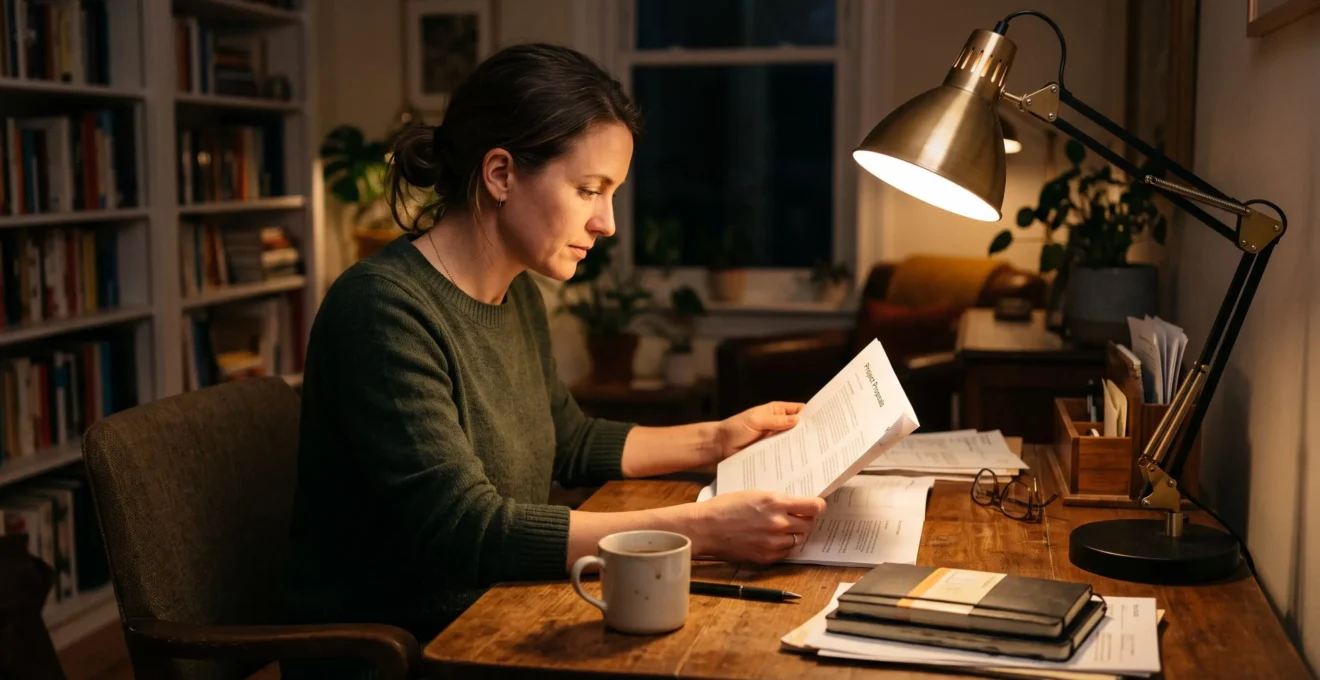
A task lamp should illuminate the page, keyboard or detailed work directly without shining into your eyes or reflecting off a computer screen. The most effective placement is usually beside the working area, with the light directed diagonally downward and the shade concealing the brightest part of the bulb from your normal seated position.
Getting this right depends on more than choosing a powerful lamp. The side you place it on, the height of its shade, the direction of its beam and the amount of background light all influence how comfortably you can see. A desk lamp can produce plenty of light yet leave your writing hand in shadow, while a reading lamp may illuminate an armchair beautifully without putting enough light on the book itself.
Rather than increasing brightness throughout the room, start by adjusting the local light source. Small changes in position often make the work surface easier to see while preserving softer illumination elsewhere.
Task lamp positioning at a glance
- Place the lamp on the opposite side of your writing hand and direct its beam toward the actual work area.
- Keep the bulb shielded from your eyes and prevent the lamp from appearing as a reflection in your screen.
- Combine focused task lighting with gentle ambient light instead of relying on one powerful overhead fixture.
- Why Can a Bright Desk Lamp Still Leave Your Work Area in Shadow?
- How Should You Position a Task Lamp Beside a Desk or Reading Chair?
- Adjustable or Fixed Task Lamp: Which Is Better for Flexible Use?
- Which Task-Lamp Positions Cause Screen Glare or Eye Discomfort?
- When Should You Add a Dedicated Task Lamp Instead of a Brighter Ceiling Light?
- Which Interior Lighting Mistakes Cause Glare and Harsh Shadows?
- How Can You Set Different Light Levels for Dining, Reading and Relaxing?
- How Can Dimmer Switches Make One Lighting Scheme Work for Different Activities?
Why Can a Bright Desk Lamp Still Leave Your Work Area in Shadow?
A bright desk lamp can leave part of your work area in shadow because its total light output does not determine where that light actually lands. A narrow beam, an unsuitable angle or an object blocking the light can produce a brilliantly illuminated spot beside a poorly lit page. Increasing bulb brightness does not necessarily correct these problems.
Light output is commonly expressed in lumens, but lumens describe the amount of visible light emitted by a source, not how evenly that light reaches your desk. The illumination arriving at a surface depends on the lamp’s position, distance, beam shape and surrounding reflections. A small concentrated pool of light may be useful for inspecting a tiny object but frustrating when reading a document spread across the desk.
Obstructed light is another common problem. If a right-handed person writes beneath a lamp positioned on the right, the moving hand and forearm may interrupt the beam and throw shadows across the writing. A lamp can therefore remain too poorly positioned even after a brighter bulb is installed.
The Canadian Centre for Occupational Health and Safety explains that fixtures, objects and people can obstruct illumination and produce unwanted shadows. Its lighting survey and corrective-measures guidance recommends examining the work area from the user’s normal working position rather than evaluating the lighting independently of the task.
A practical way to identify the problem is to place a blank white sheet where you normally read or write. With the task lamp switched on, observe the brightness across the sheet and the surrounding work surface. Move your hand through its normal working positions and look for shadows that cross the paper.
Adjust the shade so the light covers the entire area used for the task, not just its centre. If the beam remains too concentrated, a wider or more diffused light distribution may be more useful than additional output.
Also examine the surrounding brightness. An intensely lit page against a nearly black desk and dark room creates a pronounced contrast. Keeping some soft background illumination can make the transition between the task and its surroundings less abrupt.
Once the beam is broad enough and unobstructed, the next consideration is positioning the lamp relative to your body and the furniture.
How Should You Position a Task Lamp Beside a Desk or Reading Chair?
Position a task lamp beside the working area, generally opposite your writing hand, with the shade directing light diagonally onto the page. For reading in an armchair, place the lamp slightly behind or beside your shoulder so its beam reaches the open book without crossing your face. Check both arrangements while sitting naturally.
For desk work, a useful starting arrangement is a lamp on the left for someone who writes with the right hand, or on the right for someone who writes with the left. This keeps the writing arm less likely to pass between the light and the paper. The same arrangement may need adjustment when the main task involves a keyboard, drawing board or object held in both hands.
Shade height matters because the bulb should remain outside your direct line of sight. As an initial reference, position the lower edge of the shade around seated eye level or slightly below, then angle the head downward. This is a positioning guide rather than a universal measurement: the shade shape, bulb location and desk height determine whether the light source is actually concealed.
For an adjustable desk lamp, try moving the head closer to the work before increasing brightness. A shorter working distance can provide stronger illumination on the page, although moving the lamp too close may reduce coverage or produce an obvious bright spot.
A reading chair requires a different arrangement. The book may move between your lap, chest and armrest, so the light should cover the position in which you actually hold it. A floor lamp beside the chair, with its head slightly behind the shoulder and directed downward, can help keep the beam off your face.
Test the position using your usual book rather than an empty chair. Hold it at your normal reading height, turn a page and lean back. If the book moves into shadow or the bulb becomes visible, adjust the lamp’s reach or angle.
The goal is not a particular height or distance in isolation. It is a working position in which the required surface is clearly illuminated without direct glare.
Five checks for positioning a task lamp
- Mark your working area: place a sheet of paper or your usual book in its normal position. The result is a clearly identified target for the beam.
- Select the lamp side: sit down and move your writing hand or turn a page. Confirm that your arm does not shade the important part of the surface.
- Adjust the shade: move the head until the bulb is hidden from your normal seated viewpoint. Verify that you see the lit page, not the exposed light source.
- Check coverage: inspect the centre and edges of the working area. Confirm that the beam covers the material you need to see.
- Repeat with room lighting: switch on gentle ambient light and check again. The final result should be a readable page without excessive contrast or distracting reflections.
If the same lamp must serve several positions, its ability to move and remain securely adjusted becomes as important as the initial placement.
Adjustable or Fixed Task Lamp: Which Is Better for Flexible Use?
An adjustable task lamp is generally more practical when users, activities or working positions change. A fixed lamp can work well for one consistent task at an established location, provided its beam already covers the necessary area. The choice depends on how frequently the light must move and whether the mechanism holds its position reliably.
Someone who reads documents at the same desk every evening may only need a stable lamp with an appropriately directed shade. By contrast, a person who alternates between handwriting, computer work and detailed crafts may benefit from a jointed arm that brings the light closer or directs it across different portions of the desk.
The distinction is not simply between a lamp that moves and one that does not. Mechanical stability and usable reach determine whether adjustability is genuinely helpful.
OSHA‘s workstation equipment purchasing checklist recommends adjustable positioning and intensity for desk lighting, along with suitable support structures. It also distinguishes the broader illumination useful for printed materials from the more controlled lighting suitable for computer-related tasks.
Before choosing a lamp, compare how the designs behave during everyday work.
| Consideration | Fixed task lamp | Adjustable task lamp |
|---|---|---|
| Best use | One consistent task in a stable location | Several tasks, users or work positions |
| Beam positioning | Limited after installation | Can be redirected or moved closer |
| Everyday adjustment | Usually minimal | May require repositioning |
| Stability | Depends on base and construction | Depends additionally on arm joints and balance |
| Space requirements | Determined by base or mounting position | Determined by base, arm sweep and reach |
| Mounting options | Freestanding or permanently mounted designs | Freestanding, clamp-mounted or other movable-arm designs |
Check an adjustable lamp in its fully extended position if possible. A head that gradually drops or joints that loosen during normal movement can make careful beam placement difficult to maintain. Measure whether the arm can actually reach the work surface without stretching across an inconvenient part of the desk.
A clamp-mounted design can free up valuable desktop space and may suit a small desk or bedside shelf. However, it needs an appropriate, sufficiently strong mounting edge. It is also less convenient to relocate repeatedly than a portable freestanding lamp.
The most useful lamp is the one that can maintain its intended light distribution throughout the activities you actually perform, rather than the one with the greatest number of joints.
Which Task-Lamp Positions Cause Screen Glare or Eye Discomfort?
Task lamps are most likely to produce screen glare when their light reflects toward your eyes from the display or when an exposed bulb sits within your normal field of vision. Placing a lamp directly behind a monitor, pointing it toward the screen or raising it too high can create distracting brightness even when the desk itself is adequately illuminated.
Reflected glare occurs when light from the lamp bounces off the screen toward the person viewing it. Glossy displays make these reflections particularly noticeable, although other screen finishes can also show distracting brightness. The problem depends on the geometry of the light source, display and viewer, so a position that works at one desk may not work at another.
A bright lamp directly behind the monitor presents an additional issue. Even without an obvious reflection, the exposed source or brightly illuminated wall around the screen can create a strong contrast with the display. This is particularly noticeable when the surrounding room is dark.
The preferred starting point is usually to place the task lamp laterally, away from the main viewing direction, with the head aimed at paperwork or another physical work surface rather than the monitor.
You can use a simple black-screen reflection test to identify problematic positions:
- Switch off the monitor so that its surface appears dark.
- Sit where you normally work, with your eyes at their usual viewing height.
- Look for visible reflections of the desk lamp or nearby windows.
- Move or angle the lamp until the distracting reflection is reduced or disappears.
- Switch the monitor on again and confirm that the working arrangement remains comfortable.
This is a practical screening technique rather than a formal glare measurement. A reflected lamp visible on the dark display indicates a potential problem, but the actual impact while working also depends on screen brightness, surface finish and displayed content.
Official workstation guidance supports controlling both direct and reflected glare. OSHA’s computer workstation lighting and glare guidance recommends supplemental lighting for reading and writing while preventing light from reflecting on the computer screen. Shielded and diffused lighting can also help control harsh contrasts.
If repositioning the lamp does not resolve the issue, consider whether the shade sufficiently conceals the bulb and whether the room’s background light is unusually low. Reducing brightness alone may make the reflection less intense without eliminating its cause.
A separate source of local light is especially useful when paperwork and digital displays share the same workstation, because each surface benefits from a different lighting distribution.
When Should You Add a Dedicated Task Lamp Instead of a Brighter Ceiling Light?
Add a dedicated task lamp when a particular activity needs more light than the rest of the room, especially for sustained reading, handwriting or detailed work. Raising the output of a ceiling fixture illuminates a much larger area and may still leave shadows on the task. A local lamp directs additional light where it is useful.
Ceiling lighting serves an important purpose: it supports movement, general visibility and the overall atmosphere of the space. But a central fixture is not necessarily positioned to illuminate a book on your lap or the surface of a crowded desk. Your head, upper body or nearby objects may block part of the overhead light.
The need for local illumination becomes more apparent in several situations:
- Precision activities: sewing, drawing, assembling small objects or working on intricate details require clear visibility over a limited area.
- Extended reading: printed pages need suitable illumination without requiring equally bright light throughout the living room.
- Evening work: a desk that receives sufficient daylight may become poorly illuminated after sunset.
- Remote workstations: a desk in a corner or alcove may receive less useful light from the main ceiling fixture.
Consider a hypothetical living room where one person reads in an armchair while another relaxes on the sofa. Increasing the brightness of the ceiling fixture affects both people, even though only the reader needs additional illumination. A properly positioned reading lamp addresses that specific need while allowing the broader room to remain softly lit.
There can also be an energy advantage to lighting a small work zone independently rather than increasing the output of several general-lighting fixtures. The actual difference depends on lamp efficiency, power consumption and how the lights are operated; a task lamp is not automatically more efficient in every arrangement.
However, local lighting should supplement rather than necessarily replace ambient lighting. A brilliant pool of light surrounded by darkness can create uncomfortable visual contrast. Low-level room illumination helps maintain visibility beyond the immediate task.
The same distinction between general and local illumination helps explain why some interiors feel harsh or poorly lit despite having several powerful bulbs.
Which Interior Lighting Mistakes Cause Glare and Harsh Shadows?
The most common lighting mistakes include relying on one powerful ceiling fixture, leaving bright bulbs exposed within the normal field of vision and positioning lights where furniture or people obstruct their beams. Strong brightness differences between adjacent areas can also make lighting uncomfortable. These problems are often better addressed through placement, shielding and multiple light sources than through greater output.
A single central ceiling light may appear sufficient when viewed from the doorway. Yet its position can create pronounced shadows beneath shelves, behind people and across surfaces where someone sits between the fixture and the work.
Direct glare is another frequent problem. An exposed bulb, a poorly shielded spotlight or a shade that reveals its light source while you are seated can become distracting even if the total illumination in the room is moderate.
Reflected glare behaves differently. A polished desktop, glossy table or computer screen may reflect a light source toward your eyes without the original bulb being directly visible. Matte surfaces and changes in the angle of illumination can help limit this effect.
Strong contrast can also make an otherwise useful lamp less comfortable. A brightly illuminated white page next to a dark screen, for instance, creates an abrupt transition between viewing areas. Adding gentle background light or moderating the task lamp may improve the balance.
Evaluate lighting from the places where people actually sit and work. A fixture that looks unobtrusive while standing may be directly visible when sitting on a sofa or leaning toward a desk.
Walk through the room at different times of day. At each usual position, check whether a bulb is exposed, whether a reflection interrupts the view and whether your body casts a shadow onto the activity surface. Repeat the inspection after dark, when artificial lighting becomes more prominent.
If several problems appear, correct the position of the most distracting light first. Moving a lamp, changing its angle or improving its shielding may solve an issue without replacing every fixture.
Once the troublesome positions are corrected, separate light sources can be combined to support different activities without forcing the whole room to operate at one brightness level.
How Can You Set Different Light Levels for Dining, Reading and Relaxing?
Set different light levels by combining independently controlled sources rather than relying on a single fixture to serve every activity. Dining generally benefits from balanced illumination across the table, reading needs brighter light concentrated on the page, and relaxing is often more comfortable with gentle indirect lighting. Each setting should preserve enough surrounding visibility for the space to remain practical.
The important distinction is between the brightness of the whole room and the illumination needed for a specific activity. A reading lamp can make a book clear without making the nearby walls or ceiling equally bright.
For dining, a pendant or another appropriately distributed source can illuminate the tabletop while softer surrounding light keeps faces and adjacent surfaces visible. Avoid a concentrated beam that leaves one place setting brightly lit while others remain in shadow.
For reading, the balance changes. A local lamp should provide clear illumination over the open pages, while an independently controlled wall light, floor lamp or indirect source maintains a softer background.
For relaxation, the local reading lamp may be switched off entirely. A wall sconce or shaded table lamp can then provide the low, indirect illumination suitable for conversation or watching television, provided the light does not reflect distractingly in the screen.
A simple evening calibration can make these settings easier to repeat:
- After dark, turn on the available room lights and sit in the normal dining, reading or relaxing position.
- Adjust the general light until the surroundings are comfortably visible.
- For reading or detailed work, switch on the task lamp and adjust its beam independently.
- Check for shadows, visible bulbs and reflected glare from each seated position.
- Record the combination of lights that works for each activity.
In a multipurpose living room, this might mean using the pendant and wall lights for dining, a reading lamp plus one soft background source for reading, and only indirect lights for relaxation. These are illustrative arrangements, not fixed brightness requirements.
Separate controls are particularly useful because adjusting one activity zone does not need to disturb the lighting elsewhere.
Dimmer switches can make these combinations more flexible, but their usefulness depends on compatibility and on whether the original light sources are well positioned.
Key takeaways before choosing dimmer settings
- Correct lamp placement before adjusting brightness: dimming will not redirect a beam or remove an obstruction.
- Keep ambient and task lighting independently controllable so each can match the activity.
- Check the dimming characteristics of the actual LED lamp and control rather than assuming every combination behaves alike.
How Can Dimmer Switches Make One Lighting Scheme Work for Different Activities?
Dimmer switches make lighting more adaptable by allowing the output of compatible fixtures to change as activities change. You can lower general room brightness for relaxation while keeping a separate reading lamp bright enough for the task. However, dimming only changes the light output and, with certain products, its appearance; it cannot correct a poorly positioned fixture.
For example, a ceiling fixture that illuminates an entire living room may be useful at higher output during cleaning or dining. The same fixture can provide a softer background when reduced, allowing a separate task lamp to illuminate a book or desk.
This works best when the two lighting functions remain independent. Dimming the ambient fixture should not automatically reduce the task lamp if the activity still requires focused illumination.
One limitation is that not every LED lamp is compatible with every dimmer. ENERGY STAR‘s LED downlight and dimmer information advises checking manufacturer compatibility guidance. Some lighting products are designed to become warmer in colour as they are dimmed, while others are intended to maintain a more consistent appearance.
Before installing or replacing a dimmer, verify that the lighting product is designated as dimmable and that the proposed control is compatible with it. An unsuitable combination may produce unstable operation, including visible flicker, buzzing or unexpected behaviour at low output. These symptoms can have more than one cause and should not automatically be attributed to the lamp alone.
For an LED product designed to change colour temperature during dimming, the resulting warmer appearance may suit an evening atmosphere. For reading, however, the more important practical questions are whether the page remains clearly illuminated and whether the light stays visually stable.
A dimmer is also not a substitute for proper shielding. Reducing a lamp’s output may make an exposed bulb less intense, but the source will still occupy the same position in your field of vision. Similarly, dimming a lamp reflected in a monitor does not change the reflection’s location.
Where a building’s fixed wiring requires modification, use an appropriately qualified electrician and follow the applicable local electrical requirements.
For a practical next step, choose your usual evening reading or desk position, adjust the lamp until the page is evenly illuminated without glare, then lower the surrounding lighting to a comfortable level. Save or note that combination so the arrangement is easy to recreate.
Should a desk lamp illuminate the keyboard or the entire desk?
The beam should primarily cover the surface relevant to the task. For handwriting, this usually includes the document and the area where your hand moves. For computer work, focused illumination may be most useful on nearby paperwork or other physical materials rather than the screen itself. There is no need to light every corner of the desk equally if those areas are not being used.
Can a task lamp be too close to a book or work surface?
Yes. Although moving a lamp closer can increase the illumination reaching a page, an excessively short distance may create a concentrated bright patch and leave the edges poorly lit. Adjustable lamps should also be used within their manufacturer’s clearance and safety instructions. Aim for useful coverage without exposing your eyes to the bulb.
Is warm or cool light better for reading?
Neither colour appearance is universally best for every reader. Warm light may suit a relaxed evening environment, while a more neutral appearance may be preferred for tasks where colours or fine details matter. Regardless of colour temperature, sufficient illumination, appropriate placement, limited glare and stable light output remain important. The sources used here do not establish one universally optimal reading colour temperature.
Can one task lamp serve two people sitting together?
It can work if the lamp distributes enough light across both working areas without creating shadows or exposing either person to direct glare. A narrow-beam lamp may not cover two books comfortably, especially if the readers hold them at different heights. Two individually adjustable lamps offer more independent control when the seating positions or lighting needs differ.
Should the task lamp stay on when working mainly with a computer?
Not necessarily. If you are viewing only the screen and the surrounding lighting is already comfortable, additional focused light may provide little benefit. A task lamp becomes more useful when you frequently consult printed documents, write notes or handle objects beside the computer. Keep its beam away from the display and avoid creating a conspicuous bright source behind it.